top of page


Optimization
This is the compilation of the optimization techniques I learned from books, online resources, and classes at my school, Gnomon. Enjoy :)
Optimization steps to take at the beginning of your project.
- Knowing target hardware and frame rate for the game
- Measuring the target number of drawcalls, polygons, post-process effects, etc., of the hardware
- Distribute the budgets to each catagory(env, character, vfx, etc.) and meet the target for the overall game.
Understanding the potential bottlenecks in each step of the graphics pipeline.
CPU
3D software
Send vertex data to GPU
Draw calls - commands that the CPU issues to tell the computer to render an object
Vertex Processor
Cheap
Convert the vertices to screen projection space
If there are a lot of vertices, it will take the GPU a long time to convert them.
GPU
Primitive Assembly
connect vertices into triangles
Rasterizer
converts triangles into pixels
Pixel Processor
Expensive
Calculate colors of pixels
Output image
If shaders are too complex,
it will take the GPU longer to calculate.
Capturing the performance of an area in a level.
- Set the camera position in the spots with the worse performance
- Turn off everything that you aren't measuring the performance of
- Package the project, test the game on the target hardware
- Measure the performance with stat unitgraph and stat fps command
- Track the data and see how the performace is reduced by the optimization method used
Finding if the problem source is in the CPU or GPU (CPU Bound, GPU Bound)
If you don't know the source of the problem, you may end up reducing visual quality without performance increase.
- Identify if the game is CPU Bound or GPU Bound by using stat unitgraph command
- Make optimizations on the processor that is SLOWER first to match the other

In this example, the draw call is taking longer than GPU time, so it is CPU bound.
Fixing CPU Bound
Case 1 : High Draw Calls
- Instancing = sending an object once to be used multple times.
- Batching = grouping objects to send together.
- Occlusion Culling = Removing objects outside camera view.
- Early Distance Culling = Stop drawing based on distance.
- Limit level layout with long sight lines.
- HLODs = Large group of meshes baked into a single object (1 draw call) for long distance rendering.
Case 2 : Low Draw Calls
- This is an engineering problem, talk to the programmer about how to optimize on their side.
Fixing GPU Bound
Case 1 : Triangle count is over the limit of your hardware.
- LODs = Avoid Quad Overdraw (Triangles smaller than 1 pixel size)
> Find the right distances for the best visual quality to match the LOD
> Depending on the asset, not using LOD0 is sometimes the right call.
- Light Optimization. Understand the 2 rendering methods of Unreal Engine.
Forward Rendering
Transparent Objects
renders objects one at a time; each object renders its own lighting.
Pros
- Unique lighting for each object
- Less texture memory (VRAM)
- Allows back to front rendering
- Fast
Cons
- High cost for lighting
Limit the number of lights on transparent objects.
Limit size of light.
Limit number of objects the light touches


Use lighting debug view to analyze
Deferred Rendering
Non-transparent Objects
Objects renders their materials into G buffer first to be used to renders lighting.
Pros
- Complex lighting could be faster
- Improved visual fidelity
Cons
- Large memory requirement
- Limited shader diversity
- No transparency support
Limit size of light on the screen (not the 3D size)
Limit attenuation and cone angle
> Turn down Lumen settings


> MegaLights - ruducing number of rays that are shooting in our scene by setting
r.MegaLights.NumSamplesPerPixel 2
r.MegaLights.DownsmapleFactor 10
Apply the changes in \config\DefaultEngin.ini, under Engine.RenderSettings

- Shadow Optimization
> Tur off shadow casting on ligght except where necessary.
> Point light shadows are especially expensive because they have to re-render the scene into a 6-sided cube.
> Spot lights are cheaper because they only re-render the scene once.
Case 2 : Pixel bound ( too long to calculate color of each pixel )
- Post Processing Optimization ( AA, SSAO, DOF, SSS, Motion Blur )
> Turn off what you don't need.
> Turn down the settings on some features and see the cost/quality trade-off.
- Overdraw Optimization ( When an object behind a transparent object also has to be rendered )
> Making particle billboards smaller, by reducing the number of particles overlap.
> For foliage, use alpha clippig opaque shaders instead of transparency.
> When using transparency, enable alpha clipping so that 100% transparent areas don't contribute to overdraw.
- Use Dynamic Resolution Scaling ( The engine automatically reduce resolution when fps gets too low )
> Should only be used after all the other things are already optimized
- Shader Optimization
Using PIX to analyze and identify optimization needs
- Run release build to find slow spots.
- Create a development build of the game.
- Lauch your dev build inside PIX.
- Find the slow spot in your game.
- Capture a frame using PIX.
- PIX analyzes the frame and displays the results.
- Use the results to identify targets for optimization.
- Find ways to improve back in the engine.

Each block size represent the time it takes per frame for each process. Choose to optimize the ones that takes the most time.

> Identify the object draw calls that takes the most time.

> List out priority of opimization types
Now we can use pick the optimization techniques to use on these objects.
-Nanite Optimization

Use Evaluate WPO
In green are the objects that its shader is causing its vertices to move (expensive).


Disabling Pixel Depth offset will help, no quality loss.

Remove Pixel Programmable
In red are objects that is causing pixel programmable.

> Use r.nanite.MaxPixelPerEdge 5 to reduce the number of polygon count.
Identifying objects with the biggest file size
- Unreal's Primitive Stats, sort by size


Could try limiting number of triangles
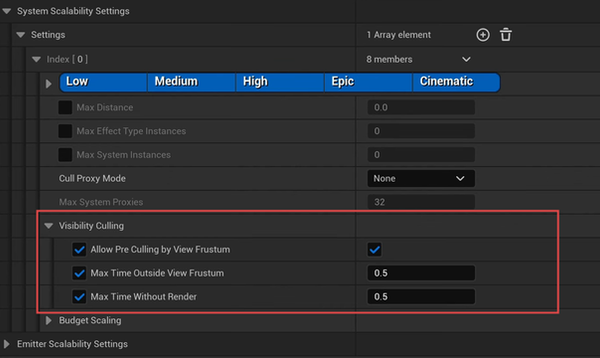
Make sure visibility culling is on in our Effect Type
Optimizing Niagara Effects
- Use stats niagara command to see call count

bottom of page